Shift-Left Security, Explained Without the Buzzwords
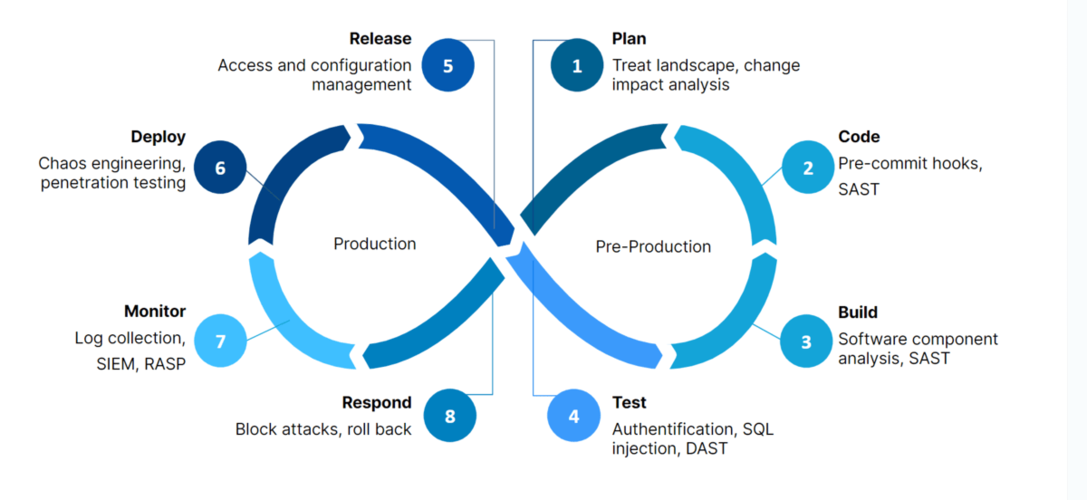
Shift-left means one thing: find security problems where they are cheapest to fix. A hardcoded credential flagged in a pull request costs a two-minute review comment. The same credential discovered in production costs an incident bridge, a key rotation across every environment, and an uncomfortable email to your customers. Nothing else about the term is complicated.
In practice, shifting left is a sequence of small moves:
- Secret detection runs as a pre-commit hook, so keys never land in git history.
- Static analysis runs on every pull request and comments inline, the way a senior reviewer would.
- Dependency checks run at build time, before a vulnerable package reaches your artifact repository.
- Infrastructure-as-code templates get scanned before terraform apply, because a public S3 bucket is far easier to prevent than to explain.
What shift-left is not: dumping a security backlog onto developers and calling it a partnership. If your engineers open a scanner dashboard with 4,000 unranked findings, they will close the tab, and you will have spent money making security less popular. The real work is tuning — suppressing what does not matter, ranking what does, and wiring findings into the tools your team already uses. That tuning is most of what a DevSecOps integration engagement covers in its first weeks, and it is why the rollout sticks.
SAST vs DAST vs SCA: What Each Scanner Actually Catches
Buyers comparing security scanners meet three acronyms that sound interchangeable and are not. Static application security testing (SAST) reads your source code like a reviewer. Dynamic application security testing (DAST) attacks your running application like an outsider. Software composition analysis (SCA) audits the open-source packages you build on. Each sees what the others cannot.
| Scanner | What it examines | When it runs | Typical catches | Blind spots |
|---|
| SAST | Source code and config files, as text | On every pull request | Injection flaws, hardcoded secrets, unsafe deserialization | Runtime-only issues; vulnerable dependencies |
| DAST | The running application, over HTTP | Nightly or pre-release, against staging | Auth bypasses, misconfigured headers, exposed endpoints | Code paths it never reaches; anything without a URL |
| SCA | Dependencies, lockfiles, container images | At build time | Known CVEs in open-source packages, license conflicts | Flaws in your own code; whether the vulnerable function is even called |
The practical takeaway: these are complements, not competitors, and sequencing beats buying all three at once. For most teams we wire SCA and secret detection first — highest signal for the least tuning — then add SAST with rules tuned per repository, and schedule DAST against a staging environment once there is a stable target to attack. A team running only one of the three is not "mostly covered"; each blind-spot column above is a door an attacker can walk through.
Software Supply-Chain Security: Protecting the Code You Didn't Write
In most production codebases, the majority of running code comes from open-source packages your team pulled in — plus the transitive dependencies those packages pulled in behind them. Log4Shell made the risk concrete in 2021: one critical flaw in one logging library sat inside millions of Java applications whose owners did not know they were running it. The 2024 xz-utils backdoor showed the newer pattern — attackers no longer wait for accidental bugs; they compromise the supply chain deliberately.
Defending it comes down to a handful of controls, applied in order:
- Know what you ship. Generate a software bill of materials (SBOM) at build time, so when the next critical CVE lands, answering "are we affected?" takes minutes instead of a week of grepping.
- Pin what you consume. Lockfiles for packages and digest-pinned base images for containers, so a build today produces the same artifact as a build tomorrow.
- Verify what you deploy. Signed artifacts and provenance checks confirm the container reaching your cluster is the one your pipeline built, not something substituted along the way.
The pipeline itself is part of the attack surface — CI runners hold some of your most powerful credentials. We scope tokens per job, isolate runners, and harden pipeline configuration, often alongside GitLab CI/CD implementation work when the two projects overlap.
Security Gates That Don't Slow Delivery Down
A security gate is a rule that stops a deployment. Designed badly, it becomes the reason engineers route around security entirely — so the design principles matter more than the tooling behind them.
Start with a baseline. Run every scanner once, record the existing findings, and exempt them from gating. From day one the gate applies only to new code; historical debt gets a ranked backlog with its own schedule instead of blocking Friday's release.
Gate on severity and reachability, not raw counts. A critical, exploitable injection flaw in an internet-facing service should block the merge. A medium finding in an internal batch job should warn and move on. A policy that treats those two identically trains developers to ignore both.
Respect the time budget. Pull-request checks must finish in under ten minutes, so we run fast scans — secrets, SAST on changed files, dependency checks — on PRs and push slower jobs like full DAST and container rebuild scans to nightly schedules. Every exception gets an expiry date, so "temporarily accepted" risk cannot quietly become permanent.
Built this way, DevSecOps gates and velocity stop being a trade-off. Our clients run pipelines shipping 50+ deploys per day with security gates on every one, and the same pipeline discipline saved one client over 200 engineering hours monthly — the full breakdown is in our CI/CD pipeline overhaul case study. Gate decisions also double as timestamped audit evidence for SOC2 compliance automation.
Building a Security Culture Your Engineers Won't Resent
Scanners enforce rules; culture decides whether anyone respects them. Every gate can be argued around by an engineer who sees security as someone else's job, which is why the durable part of a DevSecOps rollout is never the tooling.
What works is specific. Appoint security champions — one volunteer engineer per team who gets extra training, triage authority, and sprint time to use both. Train on your own code: a workshop walking through three real findings from last month's scans lands harder than any generic OWASP slideshow. Treat security findings like production incidents — blameless, focused on the control that was missing rather than the person who committed the flaw. And publish two or three metrics that reward the right behavior: time-to-remediate criticals and vulnerability recurrence rate say more than a raw finding count ever will.
Leadership sets the ceiling. DevOpsServicesPro engagements are led by CTO Muhammad Nahid Mondol (CKA, CKS, and AWS SAA certified), whose team ran a zero-downtime healthcare migration where compliance requirements shaped every deployment step. If you want to see how a champions program and a tuned pipeline would fit your team, tell us about your stack — a 30-minute conversation is enough to scope it.