CI/CD & Deployment

GitLab CI/CD Implementation

Complete GitLab CI/CD setup and optimization for integrated development, testing, and deployment workflows

Starting from $2200.00
Contact Us
GitLab CI/CD Implementation

Our GitLab CI/CD implementation services help you leverage GitLab's integrated DevOps platform for end-to-end software delivery. We design and implement pipelines that take full advantage of GitLab's features while following industry best practices for security, testing, and deployment automation.

Key Components

  • Pipeline Architecture: Design scalable pipeline structures that match your workflow
  • Security Integration: Implement SAST, DAST, and container scanning in your pipelines
  • Testing Automation: Integrate unit, integration, and end-to-end testing
  • Deployment Strategies: Implement blue-green, canary, and rolling deployments
  • Monitoring Setup: Configure pipeline monitoring and alerting

With our GitLab CI/CD services, you'll achieve seamless integration between development, testing, and deployment processes, resulting in faster and more reliable software delivery.

Key Features

Integrated DevOps pipeline design
Security scanning implementation
Automated testing workflows
Advanced deployment strategies
GitLab registry integration
Performance monitoring setup

Benefits

Streamlined development workflows
Enhanced security and compliance
Faster feedback loops
Reduced manual intervention
Improved deployment reliability
Better visibility into delivery process

GitLab CI vs Jenkins vs GitHub Actions: Which Fits Your Team?

All three platforms run automated pipelines, but they put the operational burden in very different places. Jenkins is the most flexible and the most expensive to own: plugin conflicts, controller upgrades, and agent sprawl all land on your engineers. GitHub Actions is the fastest to adopt when your code already lives on GitHub, though deeper security tooling mostly comes from third-party marketplace actions you have to vet yourself. GitLab bundles source control, CI/CD, a container registry, and security scanners into a single application — fewer integrations to maintain and one vendor to audit.

FactorGitLab CI/CDJenkinsGitHub Actions
Maintenance burdenLow — one application, CI built inHigh — plugins, controller upgradesLow — SaaS-managed
Security scanningBuilt in (SAST, DAST, containers)Assembled from pluginsMostly third-party actions
Runners / agentsAutoscaling, Kubernetes-nativeSelf-managed agentsHosted or self-hosted runners
Container registryIncludedSeparate tool requiredGitHub Packages, billed separately
Self-managed optionYes, full-featuredYesLimited (Enterprise Server)
Best fitTeams consolidating their toolchainHeavily customized legacy estatesGitHub-centric product teams

The right answer depends on where your code lives, your compliance obligations, and whether you must self-host. When Jenkins is the better long-term fit, we say so — our Jenkins pipeline optimization service exists for exactly that case. When a team wants to collapse five tools into one platform, a GitLab CI/CD implementation usually wins the total-cost comparison.

How Do CI/CD Pipeline Stages Work in Business Terms?

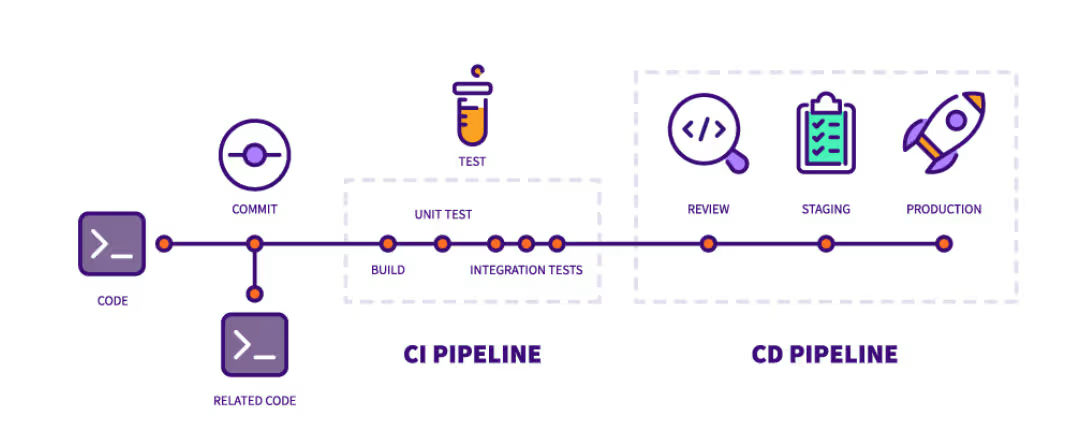
A GitLab CI/CD pipeline is a series of automated quality gates between a developer's keyboard and your customers. Each stage answers one question, and each one catches problems while they are still cheap to fix.

  1. Build — "Does the code even compile?" Broken commits are stopped within minutes instead of being discovered by QA days later.
  2. Test — "Does it still do what it did yesterday?" Automated suites replace the manual regression pass that used to eat a week before every release.
  3. Security scan — "Did this change introduce a vulnerability?" Code and dependencies are checked before merge, not in next quarter's penetration test.
  4. Review environment — "Does it work somewhere that looks like production?" Each merge request gets a disposable environment a product manager can actually click through.
  5. Deploy — "Can we ship without a war room?" Progressive rollouts send the change to a small slice of traffic first and roll back automatically if error rates rise.

The commercial logic is simple: a defect caught at the build stage costs one developer a few minutes, while the same defect in production involves support tickets, incident calls, and customers who saw it first. That mechanism — not anyone typing faster — is how our clients reach 90% faster deployments. The pipeline removes waiting, not effort.

What Do Slow Releases Actually Cost?

Slow releases never appear as a budget line item, which is exactly why they survive for years. The cost hides in four places:

  • Payroll burned on ceremony. Ten engineers each losing four hours a week to manual release steps, deploy babysitting, and rollback drills is roughly 170 hours a month — a full-time salary producing zero features. One pipeline overhaul we delivered returned 200+ engineering hours every month.
  • Deferred revenue. A feature that is finished but waiting two weeks for the next release window earns nothing while it sits. Multiply that idle time by every feature in every release cycle.
  • Big-batch risk. Infrequent releases bundle dozens of changes, so when production breaks, isolating the culprit takes hours of diffing. Teams shipping small batches — some of our clients deploy 50+ times a day — trace a bad change in minutes, which is how a 5-minute mean time to recovery becomes realistic.
  • Hiring drag. Senior engineers ask about deployment frequency in interviews. A quarterly release train reads as a warning sign, and the candidates you most want are the quickest to walk away.

A quick self-audit: multiply hours per release by releases per month by your loaded hourly engineering cost. For most mid-size teams that number alone exceeds the cost of fixing the pipeline.

What Is the Migration Path from Legacy CI to GitLab?

A rip-and-replace migration is how a CI upgrade turns into an outage. We run migrations in five phases so your teams never lose the ability to ship:

  1. Inventory and audit. Catalog every job, trigger, credential, and artifact in the old system. Most organizations discover a surprising share of their jobs are dead weight that never needs migrating.
  2. Pilot conversion. One active repository moves first. Jenkinsfile Groovy or Bamboo specs become declarative .gitlab-ci.yml, and the pilot surfaces the auth, artifact, and notification quirks specific to your environment.
  3. Parallel run. Old and new pipelines execute side by side on the same commits until their outputs match. Your release process keeps working the entire time.
  4. Template rollout. Shared pipeline templates via include: mean fifty repositories consume one maintained definition instead of fifty diverging copies — this is where long-term maintenance cost collapses.
  5. Cutover and decommission. Repositories switch in waves, the legacy controller is archived, and its license and server costs come off your books.

Runner infrastructure gets planned in phase one rather than bolted on at the end, because agent capacity is where most migrations stall: the new pipelines work, but builds queue for twenty minutes. Typical timeline is two to six weeks depending on job count and compliance overhead. Describe your current CI estate through our contact page and we'll return a phase-by-phase estimate rather than a vague quote.

How Does Security Scanning Work Inside the Pipeline?

The useful shift is architectural: scanners run as merge-request gates on every change, not as a quarterly report nobody owns. In a well-built GitLab pipeline, five checks run automatically. SAST reads your source for exploitable patterns. Dependency scanning compares every library you import against known CVE databases. Secret detection catches an AWS key or database password the moment it is committed, before it ever reaches a shared branch. Container scanning inspects the image you are about to ship, base layers included. DAST probes the running review environment the way an attacker would probe production.

The operational difference is where findings land. Instead of a PDF that circulates months after the code shipped, results appear in the merge request widget while the author still has full context, so the fix usually happens the same day. Approval policies can hard-block a merge that introduces a new critical vulnerability — security stops depending on someone remembering to check.

There is a compliance dividend too: every scan result is timestamped and attached to a specific commit and pipeline run, which turns audit evidence gathering from archaeology into a query. For teams that need to go further — policy-as-code, runtime controls, compliance frameworks — this pipeline work is the foundation our DevSecOps integration service builds on.

Frequently Asked Questions

How much does a GitLab CI/CD implementation cost?

Pricing is fixed-scope rather than hourly. A single-application pipeline — build, test, and deploy stages plus runner setup and handoff documentation — sits at the small end; multi-repository programs that add security scanning, shared templates, or a legacy-CI migration scope higher. After a short review of your repositories and current tooling we quote one fixed price in writing, so nothing changes mid-project.

How long does it take to set up GitLab CI/CD?

A single application typically goes live in one to two weeks. Multi-team rollouts that include a Jenkins or Bamboo migration usually run four to six weeks, and most of that is the parallel-run phase where old and new pipelines execute side by side. You keep shipping on your existing system the whole time — cutover only happens after outputs match.

Do you support both GitLab.com and self-managed GitLab?

Yes. We implement on GitLab.com SaaS, on self-managed GitLab running in your cloud or on-premises, and on GitLab Dedicated. The pipeline code is identical across editions; what changes is runner architecture, backup strategy, and who owns upgrades. If you are undecided, we map the licensing and infrastructure cost of each option against your compliance requirements before any build work starts.

Can you run GitLab Runners on our own AWS or Kubernetes infrastructure?

Yes, and for steady workloads it is usually the cheaper option. We deploy autoscaling runners on EC2 — including spot instances, which cut compute cost sharply for interruptible CI jobs — or use the Kubernetes executor so each job runs in its own isolated pod on your existing cluster. Either way, build capacity scales with demand instead of sitting idle on fixed servers.

Who actually does the implementation work?

Engagements are led by our CTO, Muhammad Nahid Mondol, a CKA, CKS, and AWS Solutions Architect certified engineer based in Singapore. Senior engineers work under his direct review, and you get direct access to the people writing your pipelines rather than an account-manager layer. The engineer who designs your pipeline is the one who answers your questions.

Will our developers be able to maintain the pipelines afterward?

Yes — the handoff is designed for exactly that. Pipelines live in .gitlab-ci.yml files inside your repositories, so changes go through the same merge-request review as application code. We document every job, walk your team through the design, and pair with your engineers before we leave. Most teams make their first independent pipeline change within days of handoff.

How do you protect our source code and credentials during the project?

We work under NDA with least-privilege access: accounts scoped to the repositories in the engagement, using your GitLab instance's own roles, and revoked at project end. Secrets stay in your CI/CD variables or vault — we never copy credentials out of your environment, and no part of your codebase is retained on our side after handoff.

Let's Build Your Infrastructure

Get expert DevOps consulting tailored to your tech stack and business goals.

Get a Quote