Monolith to containers: a realistic roadmap
Most application containerization projects stall because teams try to jump straight from a monolith to microservices. The sequence that actually ships is incremental: containerize what you have, then split only where the payoff is provable.
- Audit dependencies (week 1). Map every runtime dependency: OS packages, environment variables, file paths, cron jobs, shared drives. This inventory becomes your Dockerfile spec and almost always surfaces undocumented config that would have broken production later.
- Containerize as-is (weeks 2–3). Wrap the monolith in a single image with no refactoring. You immediately get reproducible builds and identical behavior across dev, staging, and production.
- Externalize state and config (weeks 3–4). Move sessions to Redis, file writes to object storage, and settings to environment variables so any container instance is disposable and horizontally scalable.
- Split by pain, not by fashion. Extract a service only when a component ships on a different cadence, scales differently, or blocks other teams. Most monoliths justify two to four extractions, not forty.
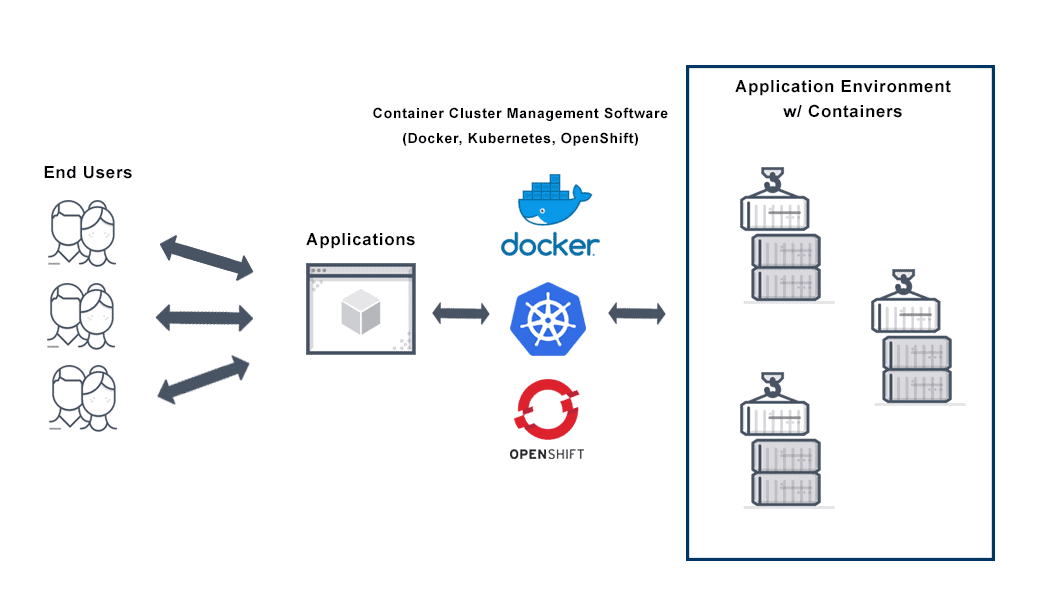
- Orchestrate. Once images run reliably, hand scheduling, scaling, and rollouts to Kubernetes cluster management.
A mid-sized application takes four to eight weeks end to end on this path, and your team keeps shipping features throughout because the monolith is never torn apart mid-flight.
Docker best practices that matter in production
The distance between “it runs in Docker on my laptop” and “it runs in production at 2 a.m. without paging anyone” comes down to a short list of practices that engineers skip under deadline pressure:
- Multi-stage builds. Compile in one stage, ship only the runtime artifacts. A 1.2 GB build image routinely becomes an 80 MB runtime image, which means faster pulls, faster autoscaling, and a smaller attack surface.
- Pin base images by digest, not tag.
node:20 is a moving target; a digest is an audit trail. Pair pinning with a scheduled rebuild so you still receive patches deliberately instead of accidentally.
- Run as a non-root user. Add a dedicated UID in the Dockerfile. Orchestrators can enforce it later, but the image should be safe by default.
- Handle SIGTERM. Rolling deploys send a termination signal before the kill. Apps that ignore it drop in-flight requests on every single release.
- Define health checks. A container that is running is not necessarily serving. Liveness and readiness probes are what make zero-downtime rollouts real.
- Log to stdout, set resource limits, keep one process per container. These three decisions are what let schedulers, log pipelines, and autoscalers do their jobs.
Every image we deliver passes this checklist before it reaches your registry, so the practices survive the handoff instead of living in a wiki nobody reads.
Container security fundamentals
Containers share the host kernel, so treating them like lightweight VMs is the mistake that turns one compromised app into a compromised node. Effective container security is layered across three stages.
Build time. Start from minimal or distroless base images so there is less to patch. Scan every image in CI and fail the build on critical CVEs rather than filing them into a backlog. Never bake secrets into layers; a credential in an image is a credential in every registry copy and every developer pull.
Registry. Use a private registry with role-based access, sign images, and deploy by digest so what runs in production is cryptographically tied to what passed your pipeline. This provenance chain is precisely what auditors ask for.
Runtime. Enforce non-root execution, mount root filesystems read-only, drop unneeded Linux capabilities, and inject secrets at startup from a secrets manager instead of environment files. Each control is one line of configuration; together they remove the most common escalation paths.
Patching also changes shape: instead of SSH-ing into servers, you rebuild the image and roll it out, which means your patch cadence is only as slow as your pipeline. Our hardening baselines are built by a CKS-certified team (Certified Kubernetes Security Specialist), and for organizations that want these gates wired into the pipeline itself rather than applied per project, we extend the same controls through DevSecOps integration.
Containerization ROI: before and after
Application containerization spend is easy to justify when you measure the operational line items it replaces. Before signing off on a project, put numbers on five metrics: how often you deploy, how long a deploy takes, how long a bad release hurts, how long a new environment takes to stand up, and how many engineering hours vanish into environment problems. Here is the before-and-after picture on those metrics, drawn from our published client results:
| Metric | Before (typical monolith) | After containerization |
|---|
| Deployment frequency | Weekly or monthly release windows | 50+ deploys per day |
| Deployment speed | Manual, multi-hour runbooks | 90% faster, fully scripted |
| Recovery from a bad release | Hours of firefighting and hotfixes | 5-minute MTTR via image rollback |
| New environment setup | Days of hand-provisioning | 10x faster, spun up on demand |
| Environment-drift debugging | “Works on my machine” churn | 200+ engineering hours saved monthly |
Two of these numbers carry most of the business case. Rollback speed converts every bad deploy from an incident into a non-event, because reverting is just redeploying the previous image. And the recovered engineering hours are effectively headcount: price 200 hours a month at your own loaded rate — at $75 an hour it works out to $180,000 a year redirected from environment babysitting to feature work. See how the math played out in practice in our Kubernetes migration case study, where deploy time dropped 90%.
Which legacy apps are good candidates
Not everything belongs in a container, and knowing the difference up front is cheaper than discovering it in week six. A useful rule of thumb: if you can script the installation, you can containerize the application.
Strong candidates: stateless web and API tiers, background workers and scheduled jobs, Java, .NET, Node.js, Python, and PHP line-of-business apps, anything with a brittle multi-step install guide, and any workload you need to scale horizontally or run identically across environments. Batch jobs are the underrated win here; they gain clean isolation and per-run resource limits with almost no rework.
Poor candidates: desktop and GUI applications, software licensed to specific hardware or MAC addresses, apps that depend on kernel modules or 32-bit-only binaries, and anything welded to an end-of-life OS. These need refactoring first or are better left on VMs.
The gray zone: stateful services. Databases can run in containers with persistent volumes, but for most teams the pragmatic move is containerizing the application tier while the database rides on a managed service, then revisiting once orchestration matures.
If you are unsure where your portfolio lands, send us your application list. We will score each app on containerization effort versus payoff and hand back a prioritized sequence you can act on regardless of who does the work.