Single vs multi-cloud: an honest assessment
Most vendors will tell you multi-cloud is the future. The honest answer: it depends on what you are protecting against. Running two providers doubles the IAM models, networking constructs, and billing systems your team has to master, and engineers whose skills transfer cleanly between AWS and Azure are rarer than job boards suggest. If you run a 20-engineer company with no regulatory pressure, a single well-architected cloud with strong committed-use discounts usually wins on both cost and velocity.
Multi-cloud earns its overhead in specific situations:
- Regulatory or data-residency requirements that one provider cannot satisfy in every region you operate in.
- Negotiating leverage. A credible ability to move workloads changes the tone of every enterprise-agreement renewal.
- Best-of-breed services — for example, training models where GPU pricing is favorable while transactional systems stay where your data already lives.
- Resilience mandates from boards or insurers that treat a provider-wide outage as an existential risk.
- Inherited estates after an acquisition, where consolidation would cost more than integration.
Our multi-cloud migration strategy work starts with an assessment that scores your portfolio against these criteria before any architecture is drawn. Many companies that come to us asking for multi-cloud leave with a deliberate single-cloud plan plus a documented exit strategy instead — a cheaper and more defensible position than accidental multi-cloud sprawl that nobody budgeted for.
Zero-downtime migration patterns
Cutting over a production system without a maintenance window is a solved engineering problem — the risk lives in choosing the wrong pattern for your workload. Four patterns cover most portfolios:
- Blue-green with weighted DNS. Stand up the full stack in the target cloud, replicate data continuously, then shift traffic in 5–10% increments. Rollback is a DNS change measured in seconds.
- Strangler fig. For monoliths that cannot move whole, route individual functions to the new environment behind a shared gateway until the legacy system serves nothing and can be retired.
- Dual-write with gradual read migration. Applications write to both databases while reads shift over incrementally. This surfaces data drift before it matters, not after.
- Replica promotion. Build the target database as a streaming replica, verify parity for days or weeks, then promote it during a seconds-long failover.
The right choice is driven by session state, data consistency requirements, and how quickly you must be able to abort. Stateless APIs tolerate aggressive canary shifts; a payments ledger does not.
We combined replica promotion with weighted traffic shifting to complete a zero-downtime migration for a healthcare platform — patient-facing systems stayed live through the entire cutover. The same playbook, with a rehearsed rollback at every stage, is how we hold a 99.99% uptime SLA during migrations.
Data gravity and how to plan around it
Data gravity is the reason so many multi-cloud architectures quietly collapse back into one provider: as datasets grow, services, analytics, and new applications accumulate around them, because moving compute to data is cheap and moving data to compute is not. Egress fees — commonly $0.05–$0.09 per GB at list price — mean a 100 TB warehouse costs five figures every time it crosses a provider boundary, before you count latency or engineering time.
Planning around gravity starts with classifying your data, not your applications:
- Systems of record (transactional databases, compliance archives) each get one deliberately chosen home cloud, and everything that talks to them constantly lives alongside them.
- Derived data (aggregates, ML features, reporting marts) is replicated selectively where each consumer needs it — ship summaries, not raw event streams.
- Ephemeral data (caches, queues, session state) is rebuilt locally in each cloud and never crosses the boundary at all.
For read-heavy public content, a CDN or edge cache in front of both clouds neutralizes most of the gravity problem outright — users hit the edge, and origin egress drops to a fraction of raw traffic.
Then map the chatty dependencies. Any two services exchanging thousands of calls per hour belong in the same cloud, and usually the same region; splitting them turns a 2 ms hop into 40 ms plus an egress meter. A migration plan that sequences moves along these dependency clusters — rather than team boundaries or alphabetical order — is the single biggest predictor of finishing on budget.
Calculating exit costs before you commit
Every architecture decision either raises or lowers the price of leaving a provider, and the time to calculate that price is before you sign — not when the renewal quote arrives. A usable exit-cost model has four line items:
- Data egress at full volume. Total stored bytes multiplied by the provider's egress rate, plus the cost of running transfer infrastructure for weeks.
- Proprietary-service rewrites. Every workload built on a single-provider service — serverless functions, proprietary databases, managed ML pipelines — carries a rewrite cost measured in engineer-months. Inventory them and multiply honestly.
- Parallel-running spend. During any real migration you pay both clouds for one to three months. Budget it explicitly, or it becomes the reason the project stalls at 80% complete.
- Committed-use penalties. Reserved instances, savings plans, and enterprise-agreement minimums you would abandon or have to sell down.
Run this math annually even if you never intend to move. Teams that know their exit number negotiate better discounts, catch lock-in drift early — each new proprietary service quietly grows line item two — and make cleaner build-vs-buy decisions. The exercise pairs naturally with a cloud cost optimization review, because the same inventory drives both.
We build this model during the strategy phase using your actual bills and architecture diagrams: a spreadsheet with real numbers, not a slide that says "avoid lock-in."
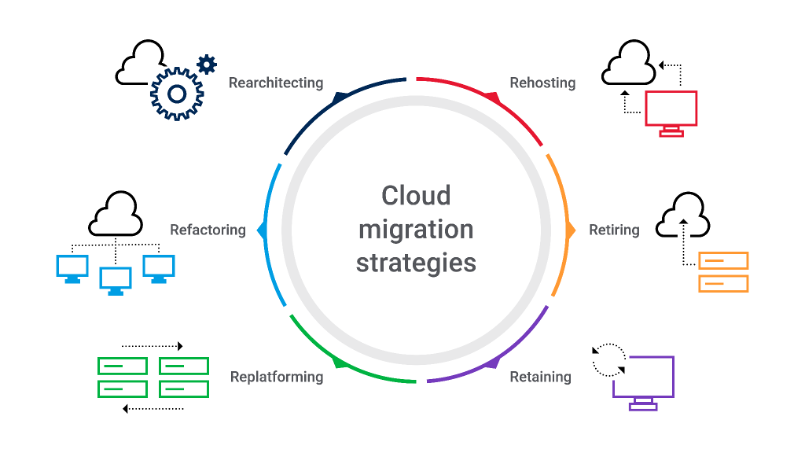
Cloud migration comparison: lift-and-shift vs replatform vs refactor
The three canonical migration approaches are not competing philosophies — they are tools with different price tags, and most portfolios use all three. Here is how they compare in practice for a typical mid-size workload:
| Factor | Lift-and-shift | Replatform | Refactor |
|---|
| Timeline per workload | 2–6 weeks | 1–3 months | 3–9 months |
| Upfront engineering cost | Low | Moderate | High |
| Ongoing cloud bill | Highest — VMs sized like old servers | Often 20–40% lower via managed services | Lowest — scales down when idle |
| Code changes | None to minimal | Config and dependency swaps | Significant rearchitecture |
| Downtime risk | Low, well-rehearsed | Moderate — data layer moves | Managed via incremental release |
| Best for | Datacenter exits on a deadline | Databases and middleware | Core products with long roadmaps |
The pragmatic sequence for most estates: lift-and-shift the long tail, replatform the databases, refactor only the systems where elasticity repays the effort. Refactoring is where the headline numbers come from — clients moving core services onto managed Kubernetes have cut deploy times by 90% and reached 50+ deploys per day — but it is the right call for a minority of workloads, not a mandate. Talk to us about which of your systems belongs in which column; that is exactly what the assessment answers.